Friday, February 02, 2007

Fedora Core 7 Test 1 Released


Fedora Core 7 Test 1 has started appearing today on the mirrors worldwide, just as I am writing this:

"Just a quick blurb. Fedora 7 Test 1 has been released today. For this particular release, we only did a Desktop spin of the package collection. We are still fine tuning targetted spins of the collection as part of the merger of Core and Extras. We also produced a LiveCD that has the ability to install to your harddrive should you wish."

Fedora Core 7 is promising new features like:

• Rock solid wireless networking support;
• Wireless firmware;
• Pungi will be used for tree building;
• Fast user switching;
• RandR 1.2;
• KVM virtualization support;
• Boot and shutdown speed-up;
• New init system;
• rpm and yum enhancements;


libata will be used for PATA support;
• syslog to be replaced with syslog-ng;
• Improved firewire support;
• Real-time kernel;
• Tickless kernel support;
• Fix wakeups across the distribution;
• Encrypted file systems.

The Fedora Core 7 Schedule:

• 23 January 2007 - F7 Test1 development freeze
• 1 February 2007 - F7 Test1 Release
• 20 February 2007 - F7 FEATURE freeze / F7 string freeze / F7 Test2 development freeze
• 27 February 2007 - F7 Test2 release
• 19 March 2007 - F7 translation freeze / F7 Test3 development freeze
• 27 March 2007 - F7 Test 3 Release / Continual freeze. Only critical bugs fixed
• 5 April 2007 - Final devel freeze.
• 26 April 2007 - F7 General Availability

About Fedora Core:

The Fedora Project is a Red-Hat-sponsored and community-supported open source project. It is also a proving ground for new technology that may eventually make its way into Red Hat products. It is not a supported product of Red Hat, Inc.

The goal of The Fedora Project is to work with the Linux community in order to build a complete, general purpose operating system exclusively from free software. Development will be done in a public forum. The project will produce time-based releases of Fedora Core about 2-3 times a year with a public release schedule.

You can download Fedora Core 7 Test 1 now from Softpedia.

You can download Fedora Core 6 now from Softpedia.

Vagina, Not so Well Protected by Its Shield

Gels containing microbicides have been praised as the miracle weapon against catching HIV infection, as they could have been used by the women in the third world by themselves, without the man's agreement, to protect themselves against infection during the sexual act.

The gels are applied intravaginally.

Now, trials of a new type of gel developed to help women protect themselves from HIV were stopped on Wednesday after women employing it got infected by HIV at a higher level than women not using it, as investigators discovered.

The experiments were made on 1333 women in South Africa, Benin, Uganda and India.

“The microbicide gel apparently made the women more vulnerable to the virus, not less vulnerable as intended,” said its makers Polydex Pharmaceuticals, based in Toronto, Canada.

The microbicide gel was


branded with the name Ushercell, and is a cotton-based product that had been checked in more than 500 women without any adverse effect about the risk of HIV infection.

A second testing experiment for the same product has also ceased its checks in 1700 women in Nigeria, out of concern for the women's life, even if in this case, the analyses did not point a higher-than-expected virus infection.

Women who got infected during the trials will receive anti HIV medication, as announced by the researchers.

"While the findings are unexpected and disappointing, we will learn scientifically important information from this trial that will inform future HIV prevention research," said Lut Van Damme, who was leading the trial of the Polydex product.

This is the second time when trials with a microbicide anti HIV vaginal gel or cream suffer spectacular failure.

The other failed product is spermicide nonoxynol-9, although it is still unclear why the product did not work and moreover, increased the risk of infection.

There are other three products in advanced trials, the last one being based on a seaweed chemical called carrageenan.

10 Years of Pushing For Linux — and Giving Up

boyko.at.netqos writes "Jim Sampson at Network Performance Daily writes about his attempts over a decade to get Linux working in a business/enterprise environment, but each time, he says, something critical just didn't work, and eventually, he just gave up. The article caps with his attempts to use Ubuntu Edgy Eft — only to find a bug that still prevented him from doing work." Quoting: "For the next ten years, I would go off and on back to this thought: I wanted to support the Open Source community, and to use Linux, but every time, the reality was that Linux just was not ready... Over the last six years, I've tried periodically to get Linux working in the enterprise, thinking, logically, that things must have improved. But every time, something — sometimes something very basic — prevented me from doing what I needed to do in Linux."

Biodata

Sebenarnya posting ini terilhami posting dengan judul sama di blog teman ku Arthur Renaldy . Jadi pengen naruh deh biodata ke salah satu postingan.

Berikut biodata ku dengan detail dan keterangan sesuai dengan blog temanku Arthur Renaldy

Nama : Raden Mas Yohanes Januar Sabbathano Sudharsono Saputra
Nama Panggilan : Ari, Januar, kake, Kambing, Mbing, kaleng, kuleng, last but not least sayang
TTL : Balikpapan, 21 Januari 1984
Zodiac : Aquarius
Hobby :Traveling, adventure, dan tak terlupakan Ngopi di warung kopi pinggir jalan ama rokok plus kacang ampe pagi

Cita-cita : Jadi Pilot (standart anak2)

Makanan fav. : Apa aja sikat
Minuman fav. : Apa aja sedot
Aktor fav. : Jarang nonton TV, sekalinya nonton TV nonton gosip

Warna fav. : biru
Motto : Achtung (Jangan Lupa berdoa)
Status : Complicated

Binun apa lagi yang mau dibilang, sama ajah kayak inspirasi nulisnya. Kata orang sih "Guru kencing berdiri, murid kencing berlari" (ndak nyambung gitu, lebih bertolak belakang) Apa seh gw jadi ngelindur.

Wednesday, January 31, 2007

Microsoft Tops Corporate-Reputation Survey

"Microsoft beat out Johnson & Johnson for the top spot in the annual Wall Street Journal survey of the reputations of U.S. companies. Bill Gates's personal philanthropy boosted the public's opinion of Microsoft, helping to end J&J's seven-year run at No. 1. From the article: 'Mr. Gates demonstrates how much the reputation of a corporate leader can rub off on his company. Formerly chief executive officer and now chairman of Microsoft, he contributed to a marked improvement in the company's emotional appeal. Jeanie Cummins, a survey respondent and homemaker in Olive Hill, Ky., says Mr. Gates's philanthropy made her a much bigger fan of Microsoft. "He showed he cared more for people than all the money he made building Microsoft from the ground up," she says. "I wish all the other big shots could do something like this." To be sure, some respondents still complain that Microsoft bullies its competitors and unfairly monopolizes the software business. But such criticism is less biting and less pervasive than it was just a few years ago.'"

Google (and Yahoo) Using Email to Profile You!

A family member (who we’ll call Bob) sent an email to my wife on the subject of Health. It was one-link to a nutrition-site product (sunflower oil and other vitamins). My wife uses Gmail for all her email needs. Bob uses Yahoo for his needs.

The email contained a single link with no other information and not even a signature. The one-link email was flanked on its right side with sponsored links from Google. Ok, this is normal.

What was not normal, and was terrifying was that the ads where for Illuminati, deep secret governments, and a whole host of underground conspiracy ads. My wife was puzzled by the ads because they had nothing to do with nutrition. She knows how the ads should work because she has an Adsense account.

Our curiosity of the misinformed ads grew quickly.

For the heck of it we decided to call Bob and ask him if he was into these types of websites? He said, “That’s where I mostly visit. And how would we know this intimate information?”

We explained; Google reads email content with electronic robots and delivers ads based on ‘The Emails’ content. So if your email is about cats, ads should appear on the subject of cats. Google has always claimed it does not track content of users email. It simply provides content-based ads.

This came as a shock to Bob! He said he spends his life investigating threats to the U.S. constitution and expects that to remain ‘private’ to his household.

With that, we all felt a chill down our spine. How is it that emails from Bob now reveal where he surfs to his recipients?

This is no mistake on Google’s part. They are beginning to profile its users through toolbars, email content, collaboration with Yahoo databases and where we visit frequently. Then targeting our associates to see if they too are interested in the same subject matter? Or is that all its for?

I have never been into conspiracy before, but this smells rotten. We have clear evidence that Google and Yahoo somehow track our behavior “Personally!”

Look at the facts:

1) Bob only uses Yahoo for all his needs. This includes email, surfing and purchases.
2) My wife received the email from Bob in her Gmail account.
3) Yahoo and Google are two separate company’s right?
4) Bob has never revealed to my wife his personal Internet life.
5) Ads about where Bob visits frequently appear where content ads should have under Google sponsored section in Gmail email.
6) Bob confirmed that these are the primary sites he visits.
7) Gmail ads should only be focused on email content.

It is becoming ever clearer to me that we are heading towards George Orwell’s 1984. By the way, I can thank Google for those conspiracy ads, which lead me to this book. What a freekin’ irony!

Google is becoming the threat that so many predicted. I guess I am just starting to wake up.

~ BigD of reflexologynation.com

How To Taste Beer

Tasting beers may seem simple to many: buy beer and drink it. However, there are an increasing number of people who understand that craft beers can be just as complex as some wines. Because so many brewers are starting to put more thought and effort into brewing beer, we as beer drinkers should also think more about what we taste when we drink beer.

Just like tasting wine, there are a few steps that one must go through to fully appreciate what one is consuming. There are many aspects to beer that makes it what it is - appearance, aroma, flavor, and body - and a beer enthusiast should be able to identify many traits of a beer within these components.

The following four steps aren’t that difficult to implement and can make your beer drinking experience a million times better, especially if you like to drink craft beers. On the contrary, these steps could quite possibly make you hate your favorite macrobrewery’s best offerings.

Observe
There are a few things to note when looking at a freshly poured beer. It is very important to pay attention to a beer’s color, clarity, and head retention. Knowing these characteristics of a beer can give you a pretty good foreshadowing of what the beer will be like when you actually taste it.

Disturb
This is obviously the easiest step but nonetheless important. By gently swirling the beer you can disturb it just enough to allow its aromas to be amplified for a moment. Before swirling your beer make sure you have your nose ready to do some analyzing.

Inhale
Many people don’t think of beer as aromatic (except once you’ve had a few too many and you begin sweating) but a beer’s smell is actually pretty important. When inhaling pay attention to whether the beer’s aroma is sweet, floral, spicy, or otherwise - these aromas often hint at what types of malts, hops, and yeasts were used and how it was brewed.

Taste
Obviously tasting the beer is the most fun and first impressions usually mean a lot, so do your best to get the most out of this step. It is important to figure out what is flavoring your beer so take notice to whether the beer is sweet, bitter, or balanced - do this by intentionally forcing the beer over your taste buds. Within a beer’s balance one can typically identify many sub-characteristics. Don’t forget to note what type of feel or texture the beer has. Along with a beer’s overall taste, body is probably one of the only things most people seem to care about, for example: America’s obsession with “light” beers. Much like a beer’s aromatic characteristics, the different parts to a beer’s taste can also tell you much about the beer’s ingredients and how the beer was made.

Hopefully these beer tasting methods will help the next time you drink a beer. I know that when I was first told about them around a year and a half ago I started noticing so much more about my favorite beers and especially beers I was trying for the first time. Once you have started using these four steps, you will eventually be able to break down each step even further, identifying more and more small details about the beer you are tasting. Good luck on your next beer tasting adventure - make sure you put your new knowledge to good use! Cheers!

Creatine Helps Muscles Grow Back


Creatine is an organic acid, found naturally in the body, where it helps supply energy to muscle cells, being commonly used as a popular nutritional supplement by body-builders and sprinters to improve muscular performance.

Now, creatine was found to help strengthening muscles in patients with muscular dystrophies.

Countless studies led to the same result: in subjects who practice sports, muscle strength was 8.5 % higher among patients using creatine, compared to sportsmen who did not take this supplement, and the gain of lean body mass was an average of 1.4 pounds (0.56 kg) higher. “Studies show that short- and medium-term creatine treatment improves muscle strength in people with muscular dystrophies and is well-tolerated,” said lead reviewer Dr. Rudolf Kley of Ruhr University Bochum in Germany.

Creatine


is used by athletes looking for short bursts of intense strength, but it turned more popular after the 1992 Barcelona Olympics, when sprinters, rowers and cyclists recognized their creatine including regimens. “Although creatine has been widely studied as a performance enhancer, it’s still not clear if the supplement makes a difference,” according to Roger Fielding, Ph.D., of Tufts University, who made recently a review of creatine treatments for neuromuscular diseases.

Patients suffering from muscular dystrophies usually have lower-than-normal creatine amounts, associated with increasing progressive muscle weakness as their condition advances.

As creatine increases muscle performance in healthy people, scientists supposed it could also help in treating diseases involving muscle degeneration.

Cochrane researchers made a meta-analysis of 12 studies realized on 266 people suffering from various types of muscular dystrophy. The volunteers took creatine supplements for three weeks to six months.

Muscular dystrophies usually emerge as the proteins that build the muscles themselves are either lacking or impaired. In metabolic myopathies, the compound important for muscle function is damaged.

Creatine seems to be beneficial for many patients with muscular dystrophies, but were not proved efficient in the case of metabolic myopathies.

But by now the results are not very consistent and more research needs to be done.

That Hot 'Terminator' Chick Would Like Some Sperm, Please!


Some may not know who Kristanna is by name, but seeing her face certainly brings up memories of how she totally kicked Arnold Schwarzenegger's ass in 'Terminator 3: Rise of


the Machines', she playing the bad guy. Sure, the part didn't require that much acting skills on her behalf, seeing that most of the time she was chasing Arnie and beating the crap out of him.

She might not have had too many lines, but her 'performance' was more than mind-blowing, especially in that naked scene. In fact, Kristanna's case is just another one of model-turned-actress for the sake of saying that she has something new to dedicate herself to. The perfect example in this sense is none other than the horror/thriller 'Bloodrayne', a movie one would go and see only out of sheer boredom.

Anyway, Kristanna is also the one who outed 'Lost' and 'The Fast and The Furious' star Michelle Rodriguez, in a November interview with 'Advocate' magazine. At the time, the gorgeous model spoke for the first time about romancing Michelle, hinting that what began as a flirt on the movie set soon became a serious relationship.

In a more recent interview, Loken said that she plans to start a family really soon, which means becoming a mom and committing herself to someone she loves, be it a man or a woman. Seeing that she's a bisexual who's dating a lesbian, that means she would have to find the perfect donor. And that she did! 'I would definitely like to have a family, and whether that's with a man or a woman doesn't really matter to me. I've already got my friend who's going to be the donor, so that's taken care of. Just give me a few years and we'll go from there', Kristanna explained.

However, her current life partner may not be aware of her intentions. Various media outlets inform that Michelle was partying in Hollywood these past days... with another woman! Eyewitnesses say that the actress was at a nightclub, where she treated the guests with a pole dance (like a professional, they say), after which she began kissing one of the women from her entourage.

'She took lemon wedges and greased the pole so she could slide better. She didn't get naked, but she was hanging upside down and twirling around. It was wild. She then made out with this woman who she came in with.', the source says, adding that the woman in question was definitely not Kristanna.

Strong Passwords

Usually, when creating an account you will have to provide a user name and a password. I say “usually” as sometimes these are generated automatically and sent to you. Most users choose a regular ID (username), something representative (in the case of automatically generated IDs, it will usually be your email address).

With passwords, things are a bit more complicated as the protection of a sensitive content is one feature that should be available.

When it comes to cracking a password, hackers use two methods: password recovery and “brute force” repetitive. The first one consists in making the system believe that the hacker is an authorized user or administrator. Brute force is actually a software that repetitively processes letter, number and symbol combinations for finding the right elements of your password (it can try hundreds of passwords per minute). Given the adequate dictionary (sometimes the hacker may know a little about your habits and way of thinking) and enough time, any password can be cracked.

So why password protection if it is impossible to keep your data safe by simply applying a countersign? The only element that will discourage hackers from cracking your password is time. A weak password can be learned in just a few minutes (that is something any hacker has) while a very strong


one can take up to days. The stronger the password, the more time will be needed to crack it. After a couple of hours, most criminals give up if the "pot" is not important enough.

A weak password is actually any word or expression. But the key to an excellent countersign is for it to be lengthy and incorporate as many symbols (“@”, “#”, “*” etc.) or special characters, period, comma, hyphen, space bar) and letters (both upper and lower case) as possible. The difficulty resides in the fact that one has to use all of these elements in a password that is easy to remember.

Creating a weak password is easy, as you can choose any word you want. Browsing over the Internet I learned that a six characters password is only OK, which in my opinion means it is fallible. A ten characters pass key is considered to be good by the majority, while a 15 characters long countersign is unanimously considered to be the best (at 14 characters and less Windows passwords are scrambled as hashes and stored in hidden Windows system files, but Windows will not store hashed passwords of 15 or longer characters). Even Microsoft acknowledges that a 15-character password with only random letters and numbers is 33,000 times stronger then an 8 characters pass with elements from the entire keyboard.

Unfortunately, some computers or online systems have a limit in what concerns the length of the countersign and a 15-character password is not supported. However, you can use all sorts of tricks for creating a strong, memorable countersign with less then 15 characters (you have the keyboard and your imagination to use).

First of all, think of a word or multi-word phrase that is meaningful to you. It doesn't matter how lengthy it is, but don't turn it into a paragraph. In my example, I will stat from “softpedia”. This password, despite the fact that it has 9 characters, reached only weak level on the strength scale provided by Microsoft. By making different combinations of characters on my keyboard, I will try to pump it up to strong level.

The first step is combining upper case letters with lower case ones, so the result should look like this: “SoFtPeDia”. This simple trick already pumped it to medium level. Combining and replacing the letters with symbols and special characters will contribute to enforcing your password. Changing “e” with “3”, “a” with “@”, “1” or “i” with “!” or turning “g” into “6”, “s” into “$” and “o” into “0” (zero) can result in creating strong passwords.

By following the above mentioned strategy and replacing the letters with other characters I should now get “$0FtP3D!@”. It looks good and the effects of the changes brought my password to strong a level of security. And to get it to best security level all I have to do is add “eez#1”. This way, I have turned a phrase (“Softpedia is number one”) into a very hard to crack password (“$0FtP3D!@eez#1”). There are 14 characters, but by adding spaces between the words, you can ensure it not to be hashed and deposited in Windows hidden system folders.

Generally, you should avoid creating passwords by using repetitive (1111) or sequential numbers (123456). It has been proven that a blank password (no password at all) is more effective. Just misspelling a word or typing it by replacing the letters with symbols or numbers will not fool a good hacker, but used together will definitely concur to creating a strong countersign.

Contrary to the popular belief that passwords should not be stored on paper, it has been proven that countersigns saved this way benefit from a better protection then if stored in password managers or somewhere on the computer. Of course, writing the password on a piece of paper and not keeping it in a safe place will also result in weak security and all the trouble of making it strong will be useless.

7 Ways to Be Mistaken for a Spammer

"The "This is Spam" button popping up on many service providers' email services can be empowering for a user, but it can also be the kiss of death for a legitimate business that gets canned with a click of that button. Dark Reading has a story on seven common missteps that can lead to a case of mistaken spammmer identity for a legit business trying to send its marketing email, newsletters or other correspondence."

Why Is It Beneficial to Have a Stable Sex Partner?


Living in couple means investing your genes in just one variant, and, like a gambling, he/she may be the best, right, not right or the worst.

But there must be an advantage in forming a monogamous pair, besides securing a sex partner, because animals have sex just during the mating season. Otherwise, they wouldn’t exist.

This is a scene not very rare in the African reserves: a herd of lions is devouring a zebra corpse, when suddenly, in the middle of the feast, a female jackal appeared, right under the nose of one lion.

The pissed off lion charged roaring towards her, but the little thief avoided it. At the same moment, another jackal appeared, stole a piece of meat and ran with it. A few hundred meters away, the male jackal shared its prey with its partner, which helped it in this diversion. On the way to their den, an eagle attacked the male jackal, thrusting its claws into its back. Then the female rushed, jumped and hit the eagle with such a power, that the eagle released its claws from the jackal’s fur and rolled over the ground.

Few days later, the male was turning back from a hunt while he found a hyena, three times his size, trying to dig up the den and eat the female.

Only the back of the hyena was visible and the male inflicted to powerful bite to the hyena’s bottom.

The hyena jumped like it would have been


burnt and turned around preparing to attack.

The next moment, the female leaped out of the den and together with its partner managed to chase away the hyena.

It’s clear: a pair achieves more food and survives better than the bachelors. That’s why the jackals spend every morning about 30 minutes grooming each other (photo above), an activity that strengthens the bond between the two.

The “married” jackals were found to live on average 3-4 years more than the solitary ones.

Of course, this is available for other mammalian species forming couples, too.

Amongst the monkeys of the Old World, only the gibbons form stable monogamous pairs (photo center).

After the age of 18, for the “married” gibbons the retirement period starts.

They can no longer produce offspring, losing the parents quality, but they are accepted by the “family” of one of their offspring, as grandparents.

This way they profit from the community protection and when it’s about feeding, they can get some scraps.

The solitary gibbons do not pass the retirement age, as they won’t be able to defend and feed themselves.

Couple life is rather rare amongst mammals, being found amongst some carnivores, monkeys and antelopes (dik-dik). In birds is something much more common.

The families can form colonies, which can be huge in the case of the marine birds (like gulls, albatrosses, petrels, penguins, auks and others), but not necessarily (crows, weavers).

In the case of the gulls nesting on steep rocks in the Northern Atlantic, the advantages of a marriage are huge.

There are many gulls looking for the best spot, but only the stable couples manage to keep their nest: while one is gone searching for food, the other remains guarding.

Lone gulls often lose their sleeping place, and the worst places are those where there is the risk of being hit to the rocks during the storms and die.

Some gulls simply can’t find the right partner.

In this case, the marriage is a continuous quarrel and the partners die at an early age.

Growing offspring would be less costly than family fight.

Researchers found that “married” gulls reach the age of 26, while the bachelors and the quarrelsome barely overpass eight.

The macaws (photo below) not only marry, but they also plan raising offspring.

A pair that lives harmoniously can reach 45 years.

Macaw females lay just 2 eggs, once every five-seven years.

This way, a density of three macaw pairs at five square kilometers is maintained naturally.

They are equally peaceful with their neighbors as they are inside their family.

And their croaking, which can last for hours, is not a fight but simply their way of making love declarations, declarations that last till they die.

Why "Yahoo" Is The #1 Search Term On Google

"Google Trends indicates that over the course of the past year the search term "Yahoo" became more popular than "sex", making it the #1 query on Google. Yahoo apparently faces a similar dilemma with roles reversed: When you search for "Google" on Yahoo, Yahoo thoughtfully displays a second search box as if to tell you, "Hey cutie, you have a search engine right in front of you!" A puzzling phenomenon? An strange aberration?"

A New Cyclic Anti Big-Bang Theory

A team at the University of North Carolina has proposed a new theory that shows the universe can endlessly expand and contract, contradicting the Big Bang theories and responding to a thorny modern physics problem.

The new cyclic model is made of four key parts: expansion, turnaround, contraction and bounce.

During expansion, dark energy, the mysterious force provoking the universe to expand at a speedy rate, expands until all matter fragments into patches so far apart that there's no matter to bridge the gaps and everything from black holes to atoms disintegrates, a phase called turnaround.

At that point, each fragment contracts individually instead of pulling back together in a reversal of the Big Bang, turning into an countless number of independent universes that contract and then start bouncing outward, reinflating in a manner similar


to the Big Bang.

Our universe would be one of these patches. "This cycle happens an infinite number of times, thus eliminating any start or end of time," said Dr. Paul Frampton, professor of physics. There is no Big Bang."

“Cosmologists first offered an oscillating universe model, with no beginning or end, as a Big Bang alternative in the 1930s. The idea was abandoned because the oscillations could not be reconciled with the rules of physics, including the second law of thermodynamics,” Frampton said.

The second law says entropy (a measure of disorder) can't be erased; instead, it grows from one oscillation to the next and the universe increases with each cycle. "The universe would grow like a runaway snowball," Frampton said. "Extrapolating backwards in time, this implies that the oscillations before our present one were shorter and shorter. This leads inevitably to a Big Bang," he said.

As this theory says each "causal patch" turns into a separate universe, then each universe would contract essentially empty of matter and entropy. "The presence of any matter creates insuperable difficulties with contraction," Frampton said. "The idea of coming back empty is the most important ingredient of this new cyclic model."

"I suddenly saw there was a new way of solving this seemingly impossible problem," he said.

"I was sitting with my feet on my desk, half-asleep and puzzled, and I almost fell out of my chair when I realized there was a much, much simpler possibility."

The new theory also changes the model about the dark energy's equation of state, describing its pressure and density, assuming for it always a value below -1, in contrast to a 2002 similar cyclic model which stated an equation value never below -1. The negative value of the equation stops the universe from blowing itself apart irreversibly in a "Big Rip."

This way, the density of dark energy is similar to the density of the universe and the expansion phase ceases just before the Big Rip. “New satellites currently under construction, such as the European Space Agency's Planck satellite, could gather enough information to determine dark energy's equation of state,” Frampton said.

Charge your Mobile Phone with your Bike


Bike Charger
Now this is one to talk about and it comes in the form of pedal power, think about this you are out and about on your bike and you stop for a little while for a break you then get your phone out and the battery is low you get annoyed and you have to pedal all the way back home because you need to charge your phone up, well not any more you can still stay out and enjoy your ride.

Bike Charger

Motorola have just recently designed a docking station for your bicycle which attaches to your bike and by pedalling like you do when your out will then charge you mobile phone up. Now that is cool and that is a gadget.

Would you buy one?

The Road to KDE 4: Kalzium and KmPlot

Since not all of the development for KDE 4 is in base technologies, this week features two of applications from the KDE-Edu team: Kalzium, a feature-filled chemistry reference tool, and KmPlot, a powerful equation graphing and visualization program. Read on for the details.
These educational tools have received a lot of work for KDE 4. In particular, Kalzium and KmPlot developments are happening at an amazing rate.
Kalzium (the German word for Calcium) has been a part of KDE since version 3.1 and is now one of the most useful applications developed by the KDE-Edu team. Initially it was just a program that displayed the periodic table, alongside some useful numbers like atomic weights, boiling points, etc. It was later extended to include a lot of background information on the elements, and more detailed chemistry information (such as emission spectra) which made it a very useful chemistry reference.

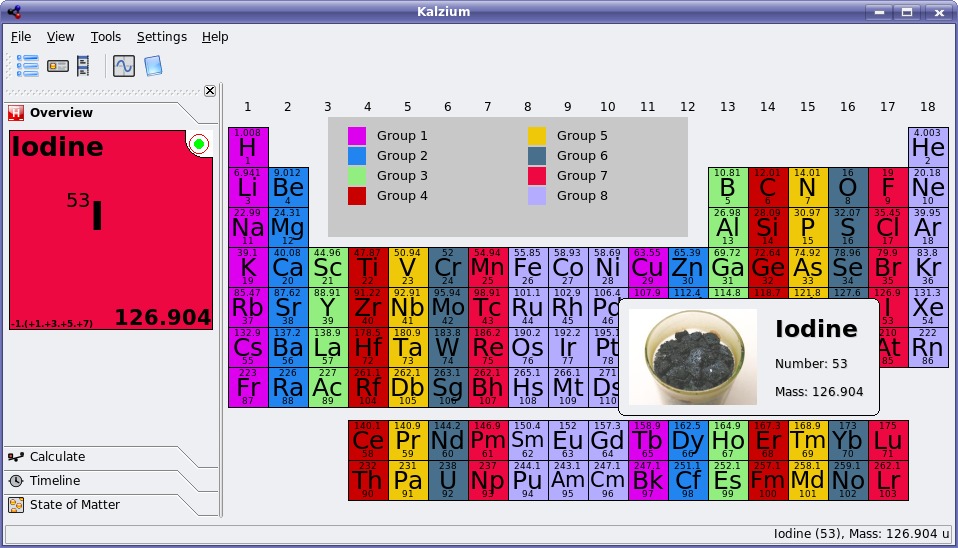
In KDE 3.5.5 (which I used for these screenshots, even though 3.5.6 was released last week), Kalzium looks something like this when first loaded:

Kalzium in KDE 3.5.5
Click for fullsize.

You can see that the interface is pretty simple, and presents a lot of information. If you click on an element it brings up even more information on its properties.

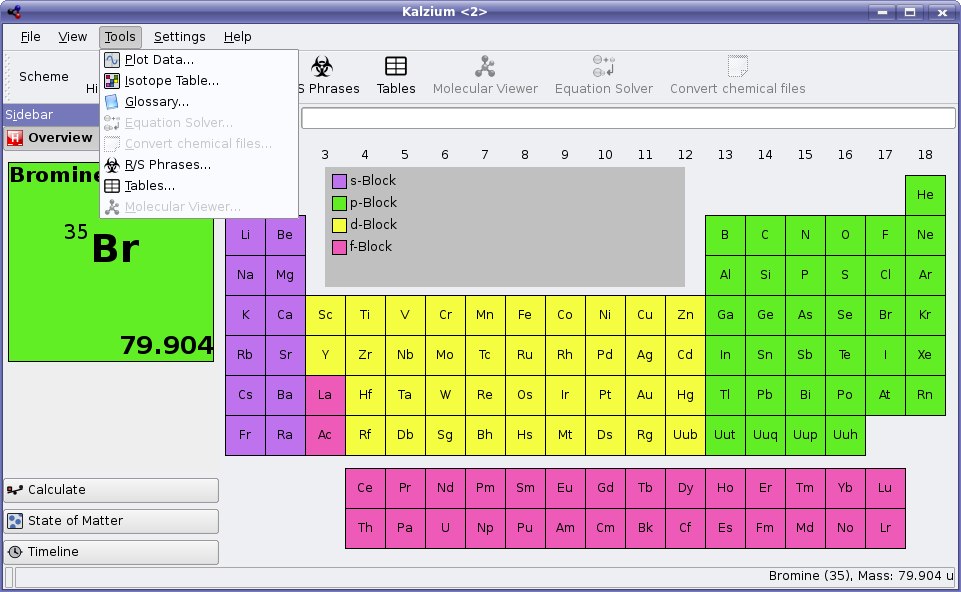
The main user interface in KDE 4 does not look that different, except for the fact that Qt 4 introduces some appearance changes, and there are some more icons (some that haven't been drawn yet) in the toolbar. Here's a peek at Kalzium in the KDE 4 development series:

Kalzium in KDE 4x devel
Click for fullsize.

So Kalzium is visually quite similar between versions at this point. However, the important thing to note in the KDE 4 screenshot is the tools menu. In KDE 3.5.5, this menu contains only Plot Data and Glossary.

Plot Data shows the elements plotted in a variety of useful ways, such as mass, radius, electronegativity, etc. while the Glossary shows definitions for many of the more common chemical terms. It is apparently missing the above mentioned electronegativity, so evidently there is still room for improvement here. Making improvements to the Glossary would be a great opportunity for a chemistry-inclined person to contribute to Kalzium in KDE 4 without having to be a programmer.

Anyway, back to the new tools. I'll focus on a few of the newly developed tools that will make Kalzium even more useful in KDE 4:

The isotope table will display a list of isotopes and their decay methods - as a geologist for example, it is important for me to know that Potassium-40 usually decays by electron capture.

The new equation solver is also quite useful, as seen in the following screenshot provided by Kalzium lead developer Carsten Niehaus:

Kalzium Equation Solver in KDE 4x devel


You basically just punch in a chemical equation leaving letters in place of the numbers you are looking for, and it spits out a response. In high school chemistry, students are expected to be able to solve these sorts of equations manually, but like most equations, once you solve enough of them, it simply becomes tedious. This equation solver can save a lot of time for complex equations.

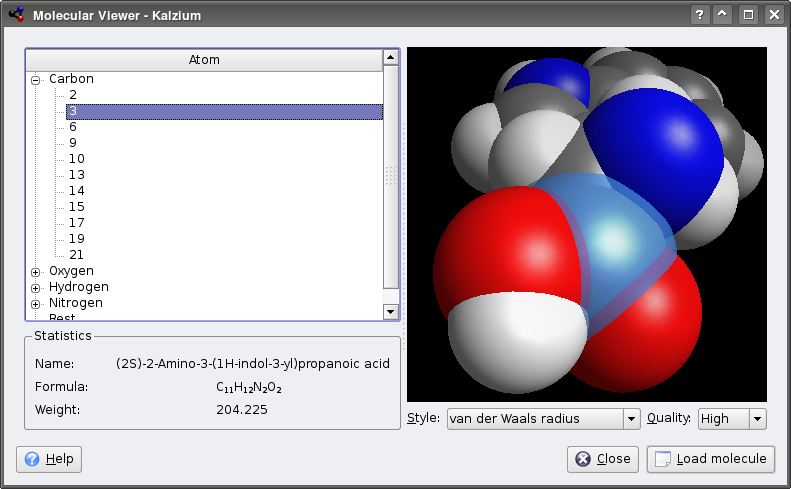
And finally, the most visible change to Kalzium is the inclusion of the Kalzium 3D work, which turns the program into a 3D molecule viewer. Initially, it was developed by the Kalzium developers for use in this application only, but some collaboration has since happened and it will now be using libavogadro a library jointly developed by the Kalzium and Avogadro developers.

According to the Kalzium developers work is progressing on porting the 3D modeller to use libavagadro, an effort led by Donald Curtis, providing a more general/powerful framework for rendering/manipulating molecules with Qt and OpenGL library. It is shared between Kalzium and Avogadro (and more). Avogadro is a much more advanced molecular modelling programs, useful for creating the actual molecule files, and doing quantum chemistry. Kalzium 3D will simply act as a viewer for files constructed using these programs.

Kalzium developer Benoît Jacob submits the following screenshot showing the 3D molecule viewer in action using the new Kalzium 3D functionality. This functionality is already SVN as this article goes to press, however work continues with libavogadro integration.

Kalzium 3d in KDE 4x devel
Click for fullsize.

Kalzium will likely ship with a library of common molecules ready to view provided by the BlueObelisk project. Thanks to the OpenBabel library, it should also be able to open molecule files in a huge variety of formats (I counted 62 file formats that it already supports).
On to our next KDE-Edu feature: KmPlot. For a while already, this application has had the ability to plot regular functions, parametric functions, and polar functions, as well as show derivatives (or regular functions) and a few other goodies. It has been useful as an equation visualization tool, but the interface has been awkward, with many little cluttered dialogs to fight with.

Below is KmPlot in KDE 3.5.5 with it's default settings, and three functions plotted, one of each type:

KmPlot in KDE 3.5.5


The dialogs used to plot these equations look something like this, except there is one unique dialog for each type of plot:

KmPlot dialog in KDE 3.5.5


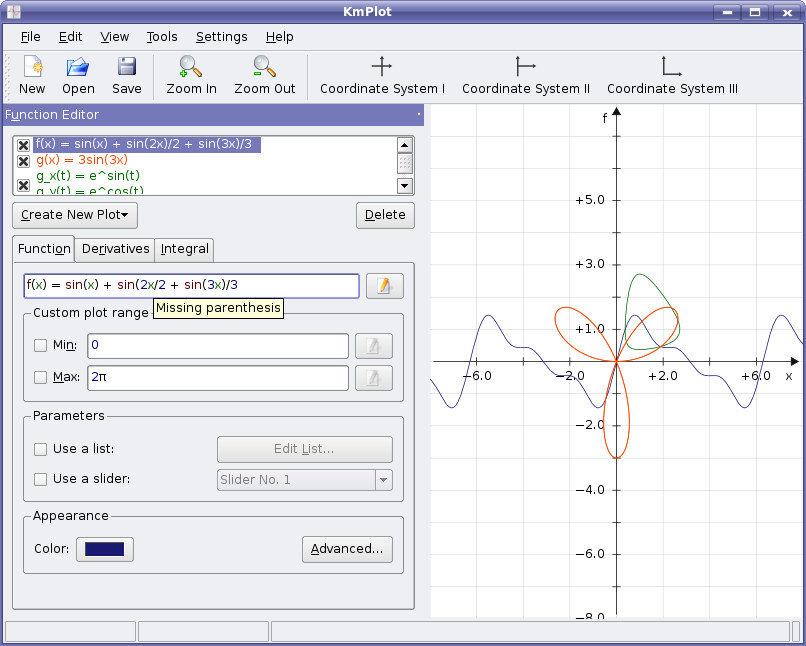
Here's a quick look of the new KmPlot interface with the same three functions plotted. No more dialogs to mess with, and the plots can be in shapes other than square! Plus Qt 4 gives everything a nice anti-aliased touch.

KmPlot in KDE 4x devel
Click for fullsize.

KmPlot has received a huge amount of work, and should be one of the KDE 4's killer apps for students, engineers, and more. It plots differential equations now, has a new equation editor, and (as seen in the above screenshot) gives tips as to how to correct your equations.

The new equation editor is shown below with a differential equation being edited:

KmPlot equation editor in KDE 4x devel


As you can see, it's much easier to enter an equation when you can design the functions in a nice syntax checking editor like this one. There is a lot more work going into KmPlot than I can describe in just this article, so if you are interested in more information, check out its development status page.
KDE-Edu is a growing project, with many great applications being developed for a wide variety of age groups. They will have support for Windows and Mac as well, thanks to the improved QT 4 and KDE 4 libraries, and should become more popular programs as a result. Since there is so much great work happening here, expect some other KDE-Edu applications to show up in future articles.

Windows Vista Gaming Performance - NVIDIA and ATI Compared

Introduction


Introduction

Chances are you might have heard of some software package that was released today; a new version of Windows or something like that. It's only the biggest software release in the last five or so years, and it has all the hardware and software vendors on their toes trying to prep their drivers and hardware to run on it.

Windows Vista is the biggest shift in the consumer software world since Windows 95. I won't bore you with all the details of what makes the new OS changes so dramatic, but some things like indexed searching, security out the wazoo, a new user interface dubbed Aero Glass, integrated Media Center software and DirectX 10 might start the feature list.

For our look at Vista and gaming performance, the new DirectX 10 with a completely new graphics driver subsystem is the most noteable change. DirectX 10 adds support for geometry shading (or rather working on geometry in the same way pixels have been for years) and requires hardware developers to move to a unified shader architecture. You can get a LOT more detail on DX10 and the changes that NVIDIA has made to their GPU architecture because of it with the GeForce 8800 series of cards by taking a look over my GeForce 8800 GPU review.

What We are Watching For

Because of these dramatic changes to the graphics system, both NVIDIA and AMD have had to spend significant time redeveloping their graphics drivers to work with the new Windows Vista operating system. Both NVIDIA and AMD (and ATI) have been working on Vista development for YEARS and we have been hearing claims of having the best "Vista Support" from both camps nearly as long. But now that the day of redemption is actually here, who will come out on top?

I decided to take the retail version of Windows Vista Ultimate, got the latest drivers from both AMD and NVIDIA as of Friday and began to spend my weekend testing. What is important to note here is that my intention is NOT to compare the ATI Radeon cards against NVIDIA GeForce cards -- rather it was to compare the gaming experiences provided by ATI and NVIDIA on both Windows XP and Windows Vista.

Should gamers worry about upgrading to Vista right away or should they wait for drivier stability and performance to catch up with the Microsoft vision? Read on to find out.

AMD's ATI Catalyst Vista Driver


Of AMD and NVIDIA, I was surprised to find that the ATI Catalyst driver team right off the bat seemed to be more organized and up beat about their Vista introduction. Having prepared a presentation for media to discuss the latest control center changes, features, short comings as well as future plans gave me the impression that AMD/ATI has been working on preparing for this day for a LOOONG time.

Catalyst 7.1 Vista Driver

While Catalyst 7.1 is already available for Windows XP, the 7.1 release for Vista was officially announced just yesterday. It is no longer a beta driver and has full WHQL certification.


The Catalyst 7.1 Vista drivers introduce quite a few new features in addition to Vista support starting with a new installer program that is easier to use and will eventually allow enthusiasts to downoad driver updates directly through it. It also brings Blu-ray and HD-DVD support to Vista and AMD GPUs for the first time, a topic of heated debate in many home theater discussion groups. ATI's CrossFire technology is added in as well (it wasn't available before hand) as are some performance and stability improvements over previous Vista revisions.


AMD was forth coming with information on the current CrossFire implementation including the lack of OpenGL CrossFire support for now. That means games like Prey and Quake 4 won't be able to use the mutli-GPU configurations though all DX9 games should be nearly on par with Windows XP performance levels.


Another big improvmenet in the Catalyst driver is the big speed up in control panel load times; one of my biggest pet peeves about ATI's most recent drivers. While I didn't bother to time the loading times I can tell with 100% assurance that the CCC is a much faster application under Windows Vista.


In addition to being faster, it is also improved upon functionally. A new 3D preview scenario actually gives the user a scene that somewhat resembles a game as opposed to a company logo or a box car on a flat polygon road.


As it mentioned in the first slide, ATI is also bringing some new features to the Vista Catalyst drivers very soon including support for MSAA adaptive anti aliasing. Using multi-sampled AA instead of super-sampled AA should allow for a nice enhancement in image quality on those alpha blended textures.


Those of you that might dual-boot with Linux when not in gaming mode will appreciate the first Catalyst Control Center for the Linux OS.


Finally, as I also mentioned before, the new download manager in the works from AMD will allow for gamers to only update the components of the software that have changed from the release they have installed. This should dramatically lower the required download sizes and annoying wait times. With just a single installer application, users will no longer need to hunt through the ATI website to find what they need.


In Practice


In real world use, by me gaming on it for a couple of days, the Catalyst 7.1 Vista driver was very stable and reliable nearly 100% of the time. I was unable to get Prey to run at all, though ATI said they could not reproduce the error. Some other driver issues are still holding this back from a prime-time preparedness though:


First, this is really aimed at the 32-bit version of Vista only for right now, and features like HD-DVD and HDMI output support aren't scheduled to hit the 64-bit version until Catalyst 7.3 sometime in March. As I mentioned, OpenGL support is a bit lacking both without CrossFire support and in single card performance. ATI admits that the "focus of this first release is to deliver a stable OpenGL driver" and that performance enhancements will be coming in later releases.


Also, as we expected with the Vista release today, even the 32-bit gaming performance is a bit behind where we have it Windows XP. As driver developers spend more time with the OS in the wild (now that everyone else can get it and test it) I expect that we should get closer and closer to a 1:1 perforance ratio.


Of course, for more details on that, check out our benchmarks in the coming pages.


NVIDIA ForceWare Vista Driver and System Setup


Just like ATI has been doing for the past three or so years, every time we sat down in front of some NVIDIA PR people at a meeting it was reiterated to us how important the transition to Vista was going to be for the industry and how far ahead of the competition NVIDIA was. The time is now, so how do they stack up?

NVIDIA ForceWare 100.54 Vista Driver

Jumping right to the thick of things, NVIDIA is well behind where AMD is at this point in driver development for Windows Vista. AMD came to me with a Vista driver a couple of weeks ago and wanted to know what our Vista tesing plans were. I had to pry a driver from NVIDIA to get testing done in time (and even then I wanted to address more titles, but couldn't for this deadline). Eventually I was given a driver in the 100 series, 100.54 that finally met the promise of Vista gaming with NVIDIA's GPUs.

First the good: the driver was very stable though not WHQL certified (just a simple prompt in Vista still to by pass) and performance in most of the games we played was playable. NVIDIA had both 32-bit and 64-bit versions available for testing though I only had the 32-bit OS as of the time of this writing.

There are more than a few issues that I felt were glaring ommissions from the driver though, the most notable of which was SLI support. As of 100.54, support for running NVIDIA's most prominently marketed technology was not available with the GeForce 8 series, 7 series or anything else. NVIDIA promised me that when the OS went live on Tuesday, January 30th, there would be a publicly available driver that WOULD enable SLI in the "top titles" -- meaning only the top tier of games. I haven't seen it yet, so I'll be just as eager to try it out as you.

Some significant faults can be found in the TV output capabilities of the driver as well; something that is actually pretty stunning considering that Media Center is going to be included with Vista Home Premium and Ultimate edition by default. HDMI support is basically a wash with some noteable image quality issues, black and white output only with the GeForce 8-series and only stereo audio output supported. Those of you that read my review of the NVIDIA PureVideo HD technology will remember how pleased I was with the over/underscan correction the driver provided -- but that isn't here in the 100 series of ForceWare drivers for Vista.

The NVIDIA control panel itself remains unchanged from the newest version seen on Windows XP; you can decide for yourself if that's good or bad though most reader's opinions tend to find it bland and difficult to use.


There is quite a bit missing from the control panel as well including some wizards for setting up TV output (makes sense, huh?) and multi-display configurations which are somewhat limted in the 100.54 as well.


As for gaming, the driver actually does pretty well! There are some stand out "issues" that were raised in the release notes that made my brow perk up a bit. Call of Duty 2 only shows solid colors when running at 4xAA in-game AA; 4xAA setting in the control panel does work though. For the 8800 cards, Apple 30" Cinema display is a bust without support for high resolutions and HDTV output is black and white. Say what?


After going through these lists I was struck with the notion that this driver seemed incredibly hurried. While the Vista OS is new, and even the 8800 cards are new, there is really no excuse for this state of driver development. The OS has been in development for 5 or more years and NVIDIA told us they had been working on G80 for over 4 years. That seems like plenty of time to get the driver in order, doesn't it?


Regardless, we still played the games we were going to (just without SLI testing) to see how WinXP performance compared to the Vista performance on Forceware 100.54.


Testing System and Setup Configuration

The test setup was pretty straight forward -- run Windows XP and Windows Vista on the same system and see how performance varied in some popular titles. Our NVIDIA rig consisted of the EVGA 680i motherboard and an Intel Core 2 Extreme X6800 CPU to test both the GeForce 8800 GTX and the 7900 GTX cards. The AMD X1950 XTX and X1950 CrossFire tests were run on an Intel 975XBX2 motherboard with the same X6800 processor. Both boards sported 2GB of DDR2-800 memory and a PC Power & Cooling 1 kilowatt power supply.

Testing Methodology


Graphics card testing has become the most hotly debated issue in the hardware enthusiast community recently. Because of that, testing graphics cards has become a much more complicated process than it once was. Where before you might have been able to rely on the output of a few synthetic, automatic benchmarks to make your video card purchase, that is just no longer the case. Video cards now cost up to $500 and we want to make sure that we are giving the reader as much information as we can to aid you in your purchasing decision. We know we can't run every game or find every bug and error, but we try to do what we can to aid you, our reader, and the community as a whole.


With that in mind, all the benchmarks that you will see in this review are from games that we bought off the shelves just like you. Of these games, there are two different styles of benchmarks that need to be described.


The first is the "timedemo-style" of benchmark. Many of you may be familiar with this style from games like Quake III; a "demo" is recorded in the game and a set number of frames are saved in a file for playback. When playing back the demo, the game engine then renders the frames as quickly as possible, which is why you will often see the "timedemo-style" of benchmarks playing back the game much more quickly than you would ever play the game. In our benchmarks, the FarCry tests were done in this matter: we recorded four custom demos and then played them back on each card at each different resolution and quality setting. Why does this matter? Because in these tests where timedemos are used, the line graphs that show the frame rate at each second, each card may not end at the same time precisely because one card is able to play it back faster than the other -- less time passes and thus the FRAPs application gets slightly fewer frame rates to plot. However, the peaks and valleys and overall performance of each card is still maintained and we can make a judged comparison of the frame rates and performance.


The second type of benchmark you'll see in this article are manual run throughs of a portion of a game. This is where we sit at the game with a mouse in one hand, a keyboard under the other, and play the game to get a benchmark score. This benchmark method makes the graphs and data easy to read, but adds another level of difficulty to the reviewer -- making the manual run throughs repeatable and accurate. I think we've accomplished this by choosing a section of each game that provides us with a clear cut path. We take three readings of each card and setting, average the scores, and present those to you. While this means the benchmarks are not exact to the most minute detail, they are damn close and practicing with this method for many days has made it clear to me that while this method is time consuming, it is definitely a viable option for games without timedemo support.


The second graph is a bar graph that tells you the average framerate, the maximum framerate, and the minimum framerate. The minimum and average are important numbers here as we want the minimum to be high enough to not affect our gaming experience. While it will be the decision of each individual gamer what is the lowest they will allow, comparing the Min FPS to the line graph and seeing how often this minimum occurs, should give you a good idea of what your gaming experience will be like with this game, and that video card on that resolution.


Our tests are completely based around the second type of benchmark method mentioned above -- the manual run through.


System Setup and Benchmarks


AMD Vista Test System Setup


CPU


Intel Core 2 Extreme X6800 - Review


Motherboards


Intel 975XBX2


Memory


Corsair TWIN2X2048-8500C4


Hard Drive


Western Digital Raptor 150 GB - Review


Sound Card


Sound Blaster Audigy 2 Value


Video Card


Radeon X1950 XTX - Review


Video Drivers


Catalyst 7.1 (8.333) - Vista
Catalyst 7.1 - WinXP

Power SupplyPC Power & Cooling 1000w

DirectX Version


DX 10 - Vista
DX 9.0c - WinXP


Operating System


Windows Vista Ultimate
Windows XP Professional SP1


NVIDIA Vista Test System Setup


CPU


Intel Core 2 Extreme X6800 - Review


Motherboards


EVGA nForce 680i Motherboard - Review


Memory


Corsair TWIN2X2048-8500C4


Hard Drive


Western Digital Raptor 150 GB - Review


Sound Card


Sound Blaster Audigy 2 Value


Video Card


NVIDIA 8800 GTX Reference - Review
BFG Tech 7900 GTX OC - Review


Video Drivers


100.54 - Vista
97.44 - WinXP

Power SupplyPC Power & Cooling 1000w

DirectX Version


DX 10 - Vista
DX 9.0c - WinXP


Operating System


Windows Vista Ultimate
Windows XP Professional SP1


Benchmarks


  • 3DMark06


  • Battlefield 2


  • Call of Duty 2


  • FEAR


  • HL2: Lost Coast


  • Prey


I tested these games at 1600x1200, 2048x1536 and 2560x1600, all running at 4xAA and 8xAF in-game settings. High-end systems like the one we have here demand minimum resolutions of 1600x1200 to be worth your money!


Battlefield 2


Battlefield 2 (Direct X)


Battlefield 2 is one of the first games to come along in quite a while that turned out to really push the current and even following generation gaming hardware. Having the privilege of being the first game that might need 2 GB of memory is either a positive or negative, depending on your viewpoint. Here are our IQ settings used:


Our map was the Strike At Karkand that turns out to be one of the most demanding in the retail package in terms of land layout, smoke and other shader effects.


Our first series of tests looks at the NVIDIA 8800 GTX and 7900 GTX experienecs under Windows Vista with Battlefield 2. With the 7900 GTX, the gaming experience remains mostly unchanged between Windows XP and Windows Vista as average and minimum frame rates stay within a close margin of each other. The 8800 GTX isn't so lucky, as we see a big drop in performance under Vista at the 2560x1600 resolution where the 100 FPS frame cap can't help as much. Here we see a 28% drop in average frame rate; and even at 1600x1200 the min FPS drops by 23% though the average remains very close to the Windows XP scores.


The AMD X1950 XTX scores from WinXP to Vista remain nearly the same with a modest 2% average frame rate change. Surprisingly we sw a 10% INCREASE in the minimum FPS using dual cards in CrossFire mode at 2560x1600! Clearly though the AMD Vista driver performance is MUCH closer to the Windows XP experience than NVIDIA's.


Call of Duty 2


Call of Duty 2 (Direct X)


Call of Duty was the best selling FPS of 2003 and Call of Duty 2 looks to continue that tradition with a great game style and superb graphics. Below are the graphical settings we used in our testing.


**Optimize for SLI is enabled in all of our testing!


The first mission was used in its entirety as the benchmark.


As mentioned earlier, running 4xAA in CoD2 through the in-game settings on the NVIDIA Vista driver presented us with all the sounds we expected but with a big solid grey colored screen. Fantastic. Switching to 4xAA set in the control panel allowed us to run it, so bear in mind we are comparing control panel set 4xAA on Vista to the in-game set 4xAA on Windows XP.


Looking at the 8800 GTX, the performance of the Windows Vista driver is very uplifting! Scores are actually modestly higher under the new OS compared to our testing under Windows XP. The 7900 GTX isn't as lucky, seeing a 12% drop in average frame rate at 1600x1200.


Again AMD's performance under Windows Vista is a very close match to that of Windows XP both in single card and CrossFire modes.


Half-Life 2: Lost Coast


Half-Life 2: Lost Coast (Direct X)


Lost Coast is the free technology demo that Valve created to show off their HDR rendering technique. Because this method of doing HDR (high dynamic range) lighting uses integer math instead of floating point, both ATI and NVIDIA cards can do both HDR and AA at the same time.


The NVIDIA Vista driver fails to impress under Half-Life 2: Lost Coast; with the 7900 GTX performance drops by 22% at 1600x1200 while the flagship 8800 GTX performance drops by 52% mainly due to a much lower maximum FPS. At the 2560x1600 resolution that we had enjoyed so much under Windows XP and the 8800 cards NVIDIA's Vista performance is 43% slower than in Windows XP and the minimum FPS is 25% lower and because of that was noticeably choppier during game play.


AMD's X1950 XTX performance in Lost Coast under Windows Vista is nearly a mirror image of that under Windows XP.


Power Consumption and Conclusions


Testing power consumption was done by testing idle power at the desktop and testing load while running 3DMark06 at 2560x1600. For testing the power consumption, I placed all the cards into the 975XBX2 motherboard to offer a common platform amongst them all.


My power consumption testing proves what I had been theorizing for some time about the introduction of the new Aero Glass user interface; idle power consumption has gone up slightly across the board. Since the new Aero Glass UI uses the DX9 technology to draw everything you see on the screen, the GPU is a lot less "idle" than it was before. Still, a modest 5-7 watts isn't much to worry about.


The load power consumption hasn't changed from XP to the Vista, and that also makes sense as the Aero interface isn't running during full screen gaming.


Conclusions


Judging frrom what we have seen thus far, the gaming performance available to enthusiasts is somewhat mixed on Windows Vista. Both NVIDIA and AMD have some areas where their cards perform well and others where they do not and features from XP to Vista haven't translated over quickly either.


Performance


First looking at the performance of the Forceware 100.54 driver and the NVIDIA GeForce 8800 GTX and 7900 GTX, I very obviously was let down by the Windows Vista gaming experience. I didnt' get to test as many games as I would have liked for this review due to the tight time restraints put on me by the driver availability, but in the games that we did go through only one of them was what I would call a "win" for NVIDIA: FEAR. In FEAR the performance under Windows Vista was nearly at the same levels we had seen in Windows XP and didn't present any issues in compatibility or stability. I guess I'd have to say that Call of Duty 2 performance was also acceptable even though we had to use control panel AA settings instead of in-game AA settings.


The experience I had with AMD's first Vista driver was much more positive. Most of the games I tested showed to be on very close performance levels to those we expected from Windows XP; the exceptions here were FEAR and Prey. Obviously with Prey not loading at all on our Vista test system, that presents a BIG problem but AMD is confident they'll find the problem and fix it fast. I'll let you know when that happens. FEAR performance was let down as well, though with the maximum FPS at 46 across the board in our tests, chances are this can be fixed pretty easily as well.


Overall, in terms of performance, NVIDIA is lucky that they have the GeForce 8800 series of cards available and AMD's R600 is still behind closed doors. The raw power of the G80 core is able to keep the 8800 GTX as our performance leader in Windows Vista even with the mentioned performance problems when compared to the AMD's flagship ATI X1950 XTX card.


Driver Features


As mentioned on the first pages of this article, the driver features comparison between ATI and NVIDIA is pretty dramatic. AMD was able to get the ATI Catalyst 7.1 driver to not only be fully functional, but added some new features like Blu-ray and HD-DVD support and a new control center that loads faster and has better previewing capability. They full admitted that OpenGL performance was going to be lower than we expected in Windows XP (though not working wasn't in the books!) but with CrossFire working in the exact same way as it did under Windows XP the AMD ATI Catalyst driver seemed pretty refined and ready for the spotlight.


NVIDIA's Forceware 100.54 driver on the other hand was more or less a mess. SLI support was not enabled and as of 10am on the 30th, the day Vista was released, it still wasn't ready. That is a very big let down for any enthusiast gamers who put their stock in NVIDIA technology with their hard earned dough. TV output and HDMI support is pretty much a wash here and several bugs stand out as making this driver revision seem rushed and hacked together. As I complained about in the earlier segments, how can a driver for a product in development for 4 years (G80) for an OS in development for what seems like forever, NOT be ready on launch day?


Final Thoughts


It may seem like my testing with gaming performance in Vista all resulted in a feeling of doom (nope, no OpenGL support!) and gloom, but don't let that scare you off just yet. I think we all expected there to be some initial growing pains with the Vista operating system and PC gaming simply because of the dramatic shift in driver technology that had to take place; I just don't think we expected it to be this bad. AMD's driver development team is definitely a leap ahead of NVIDIA's as the initial release ATI Catalyst driver offered a gaming experience much closer to that of Windows XP in the new Vista OS than NVIDIA's initial Forceware release. This may change as driver revisions are updated through the comings months, so we'll definitely be keeping an eye on both companies progress.


For now, gamers that were interested in running off to get a copy of Windows Vista, I'd caution you to take a minute and contemplate. Gaming under Vista is definitely possible and if you're comfortable with some slight performance drops for now while taking advantage of Vista's other new features, then a move to Vista sooner rather than later should be considered. If gaming and gaming performance is your only metric for your PC, then I'd definitely hold out on upgrading until AMD and NVIDIA have their software perfected.