Monday, February 12, 2007

Strange statues around the world


  1. Frogner Park, Oslo, Norway (thanks Stenar, jac). Sculpture by Gustav Vigeland.
    1 - oslo, norway.jpg

  2. Stockholm, Salzburg; Sweden (thanks Johannes, David, Mogens Beltoft, Yuriy Korzhkov)
    1 - sweden.jpg 2 - sweden.jpg3 -sweden.jpg4 - sweden.jpg

  3. Prague (thanks Michael, Matt Simpson)
    1 - czech 2 -czech

  4. Statue of german writer Kafka, Prague, Czech (thanks Jon Elbert)

  5. Brussels, Belgium (thanks jamyleloup)
    belgium 1

  6. The man who measures the clouds by Jan Fabre, Belgium (thanks David Felizarda)

  7. By Damien Hirst. 5th Ave., Manhattan, US (thanks Chris Coleman, nelis)
    90.jpg

  8. Salt Lake City, Utah, US (thanks Stenar)
    39.jpg

  9. Fremont Troll of Seattle, WA, US (thanks vanjulio)
    126.jpg

  10. Turin, Italy (thanks texilee)
    81.jpg

  11. Bratislava, Slovakia (thanks Daniele)
    3.jpg 12.jpg

  12. “The Illuminated Crowd”, in front of the Banque Nationale de Paris tower, Montreal, Canada (thanks SNF)
    26.jpg

  13. Melbourne, Australia (thanks catenoid)
    13.jpg73.jpg 77.jpg

  14. Minsk, Belarus (thanks Aleh)
    24.jpg 66.jpg

  15. In front of the Ernst & Young building, Los Angeles, US (thanks Pam)
    43.jpg

  16. Toronto, Canada (thanks Kristan)
    129.jpg

  17. Mazinger Z, Spain (thanks mpc, Ten, Mat)

  18. Atocha RailStation, Madrid, Spain (thanks guimi)
    55.jpg

  19. Optimus Prime, China (thanks Juan Incognito)

  20. Malmo, Sweden (thanks kip, dragonsden)
    9.jpg

  21. UOB Plaza, Singapore. Address: 80 Raffles Place. (thanks Juhu)
    85.jpg

  22. La Pouce, Paris, France (thanks Jeff, Marc Lacoste)
    137.jpg

  23. Depiction of a bread line, Franklin Delano Roosevelt Memorial, Washington, DC, USA (thanks JohnK3)
    34.jpg

  24. Berlin, Germany (Lou)
    64.jpg

  25. Russia (thanks littlebat)
    107.jpg 134.jpg119.jpg

  26. Cheltenham, UK (thanks Tim)
    72.jpg

  27. Millesgеrden, Stockholm, Sweden. By Carl Milles (thanks Twee)
    65.jpg

  28. Yerevan, Armenia (thanks Hayk)
    98.jpg 111.jpg118.jpg

  29. Oxford, UK (thanks CdrJameson)

  30. “Tête au carré” building by Sosno, Nice, France (thanks gimix)
    41.jpg

  31. Singapore (thanks Misayo)
    42.jpg

  32. Amsterdam, Holland (thanks Korilian)

  33. Asus headquarter, Taiwan (thanks Phil). It is made from computer chips
    48.jpg

  34. Kiev, Ukraine (thanks Eugene). It commemorates a local comedy actor truly beloved by public - he liked to sit at that very place with his old dog.
    96.jpg

  35. Nuremberg, Germany (thanks Nick, Armin)
    37.jpg

  36. Bremen, Germany (thanks morlach01)
    40.jpg

  37. Trafalgar Square, London (thanks sam_m, MJ, Simon C). A sculpture of Alison Lapper by Marc Quinn
    83.jpg

  38. Kharkov, Ukraine (thanks PHWizard)
    74.jpg

  39. Monaco (thanks NK)
    125.jpg

  40. Cologne, Germany (thanks Alexandre)

  41. In front of The Institute for Microbiology, Tuebingen University, Germany

  42. Statue of a tourist, Shanghai, China (thanks Jakob)

  43. near San Giovanni train station, Como, Italy (thanks Dario)
    80.jpg

  44. Wateringen, Holland (thanks FBS, Roadie)
    116.jpg

  45. Potsdam, Germany (thanks Ola)
    106.jpg

  46. Santa Fe, New Mexico (thanks Gatrh, Paul)
    103.jpg

  47. Springfield, Missouri, US (thanks Noella)
    35.jpg


Around the world

  1. 113.jpg

  2. 120.jpg

  3. 133.jpg

  4. 135.jpg

  5. 18.jpg

  6. 19.jpg

  7. 2.jpg

  8. 21.jpg

  9. 32.jpg

  10. 33.jpg

  11. 36.jpg

  12. 38.jpg

  13. 45.jpg

  14. 49.jpg

  15. 52.jpg

  16. 54.jpg

  17. 62.jpg

  18. 63.jpg

  19. 69.jpg

  20. 70.jpg

  21. 76.jpg

  22. 6.jpg

  23. 7.jpg

  24. 8.jpg

  25. 82.jpg

  26. 84.jpg

  27. 86.jpg

  28. 87.jpg

  29. 95.jpg

  30. 97.jpg


Also check out our selected content at haha.nu

Kensington Notebook Firewall

Written by Jay This little piece of equipment made its way onto my stores shelves the other day, made by Kensington, the “Personal Firewall for Notebooks” resembles a USB key in every way shape and form. So how does it protect in “all wireless environments”? Is it a wireless card as well? If so does it have flashdrive capabilities built in? Lets check it out...

Device in its Packaging


Kensington claims this device :

Detects and protects against hackers in all wireless environments--even outside corporate firewalls.

Hides your identity from the Internet.
Safeguards important data stored on your notebook.

Simply plug the key into your notebook to activate the firewall; remove the key to disable.
Protection will not interfere with corporate firewall and anti-virus software.

Installation

Upon putting it my USB port, it detected that I was running other firewall software that conflicts with the device, so that was the answer to how it protects (although it seemed a bit obvious), it runs a software firewall. After not just disabling, but having to uninstall my Sygate Personal Firewall, the device (and software) finally installed itself.

One thing I found interesting during the installation, Windows detected the device not only as a USB mass storage device, but it also detected as a CD-Rom drive. This makes it so the program files are untouchable, they can not be deleted, modified or re written, and the drive auto runs the same as if you were inserting a CD. Good idea. The device shows up in My Computer as both a removable disk and a CD Rom. The real disappointing part is that the total combined size of the drive is under 12 MB, with only 5 of that writable. The directory it creates in the Program Files folder is relatively tiny to begin with, just over 500Kb.

The Firewall Interface

There’s honestly not a huge amount to say here, it is an overall user friendly interface, but as with most software firewalls, if you’ve seen one you’ve seen them all. There are slider bars for levels of security, ranging from high to low to custom, for both internet and network settings, with profiles for both home and office. Overall the firewall is a nice little piece of software with quite a few of the more common options. The one nice thing I see about the software is the profiles for both home and office.

Conclusion

Overall I think the device can be easily (and freely) replaced by Sygate or Tiny Firewall. The space to store things on the flash drive is a nice added touch, but with only 5 MB, you can’t store all that much. It would be nice to see a 256 MB or 512 MB version of this released, possibly with portable Firefox and Open Office preinstalled, for a complete portable security solution. The device truly isn’t for locked down company computers as it claims to be, as it does create a directory in the C: drive to store its preferences in during the installation process.

Final Thoughts

Buy a months supply of Tim Hortons Coffee with the money you’d spend on this. The time it would take for you to walk to your IT department to have them install the program (or for you to do it yourself on your personal computer), install Sygate Personal or Tiny Firewall instead and spent the $60 CAD a better way. That way there’s no USB key to loose.

Saturday, February 10, 2007

Stand-alone controller runs Linux


United Electronic Industries has introduced the UEIPAC line of programmable automation controllers. These stand-alone modules contain an embedded computer running a standard Linux operating system, two Ethernet ports, a serial port, an SD card interface, an inter-PAC sync interface, and either three or six I/O card slots.

I/O boards add up to 150 analog inputs and 288 digital I/O channels. Other I/O boards add analog outputs, counter/timer channels, quadrature encoders, serial ports, CAN bus ports, and ARINC-429 interfaces. You can write your application on a PC and download it to the controller, which can then operate as a stand-alone unit. The modules operate in harsh environments from –40°C to +85°C, at 5g vibration, 50g shock, and up to 70,000 ft in altitude (for aerospace testing).

Prices: UEIPAC 300 (3 I/O board slots)—$1495; UEIPAC 600 (6 I/O boardslots)—$1795. United Electronic Industries, www.ueidaq.com/PAC.

The People of the Waters


People inhabit the most different regions of the Earth, from seashore to over 4,000 m (12,000 feet) altitude and deserts where temperatures overpass 50 degrees C or polar zones.

Not only the ground, but water too serves, since the oldest times, for some human populations as natural environment, in which they organize a specific life.

But why water?

Because the great water surfaces, with their inexhaustible vegetable and animal richness, allow a relatively easy food and clothing procurement, being at the same time facile paths of connection with the outside world.

Aquatic settlements also represent natural fortresses which defend their inhabitants against the attack of wild beasts or enemy tribes.

That’s why some populations keep on building houses on water.

Let’s know some of the palustrine populations.

In northeastern India, on the Valley of Brahmaputra River, amongst other peoples, live the Garos.

Their houses are inside the wet jungle, surrounded by hills.

Before the beginning of the monsoon (from June to October, bringing huge amounts of rainfall that floods large areas), the Garo people, which live during the dry season in bamboo


huts, move in “suspended” houses.

The walls, the floor and the ceiling of these houses are made of bamboo.

Even if for securing the wood, Garo people do not use nails, their houses are solidly installed on their pylons.

Garo people also use pre-built materials: the walls and the floor are interlaced before, during the building process they are just bonded with bamboo bindings.

Once, Garo people were headhunters.

In the center of Cambodia is the Tonle Sap Lake, which trough the Tonle Sap River is connected to Mekong River, the biggest in Southeast Asia.

During the rainy season (May to October), the lake increases its surface six times (from 2700 to 16,000 square km-1000 to 6000 square miles), and the average depths from 1 m to 9 m.

This lake has a great fishing importance.

Fishermen around the lake have houses built on rafts (photo 1,2), secured by stilts implanted on the bottom of the lake.

The floor can be moved up and down on these stakes, depending on the level of the waters.

Kennels and coops and even kitchen gardens can be seen on the rafts attached to the main house with bamboo ropes.

When the waters retreat, the houses and the coops are left on the ground.

In the capital of the Sultanate of Brunei (northeastern Borneo), named Bandar Seri Begawan, there is a district called Kampong Ayer (“Water Village”) (photo 3), built on the water and compassing about 30,000 inhabitants (10 % of the country’s population).

The houses are gathered and connected by narrow decks.

To enter a house, a staircase like those for a chicken coop is used.

The housings are simple, but very neat.

Between the planks of the floor are spaces so large that the water below can be seen.

Some say that these housings were build up for sanitary reasons, others that as defense but what’s definitely clear is that the air over water is cooler than the hot one over the ground, of 35-38degrees C all year round and with not a breeze (the so called equatorial calm).

In front of the houses there are built platforms.

That in the front of the school is big enough to serve as schoolyard.

On the Luzon Island, the biggest in Philippines, live the Tagalog (“those near the river”) people, named so because of their habit of establishing themselves near waters.

Some of the tagalogs live in small boats named “kasko”.

They migrate from place to place in their small vessels.

These people do not practice agriculture and live from sea resources.

On the Andes High Plateau called Altiplano, at the border between Peru and Bolivia, the Lake Titicaca is situated.

This is the largest high altitude lake (8,372 square km) and the navigable lake situated at the greatest altitude (3,812 m).

Amongst the inhabitants of the region are the Uros people, who found in other times refuge from Inca in the center of the lake.

They inhabit artificial islands (photo 4) called totorals on the Titicaca Lake.

The islands are made from floating rafts made by totora, a type of reed that grows abundantly at the lake’s shore.
These islands can last to 30 years, harboring up to 10 families.

Totora is also used for making mats, ceilings, and so on, but also serves as forage.

For traveling around the lake, the Uros use totora boats, with high extremities and made of long totora sheaves, tightly secured with vegetable ropes that make a perfect tightness.

In the center of Amazonia region lies the city of Manaus, inhabited by almost 2 million people.

Here, the temperatures are almost the same all year round only that the winter is rainy and the waters swell.

During the rains, many floating houses (photo 5) of the indigenous people, made of cashew brown-red wood, glossy and very resistant, are ripped off from their anchors and dragged in other places.

None is scared by this sudden removal, and when the rainy season ceases, the inhabitants restart their occupations, like nothing would have happened.

Take Full Control of Your Computer

1st Security Center Pro by SSS Lab Inc

Version reviewed: 5.0.2.1

1st Security Center Pro is a security software that protects your PC.

Some features:

You can deny access to each individual component of several Control Panel applets, including Display, Network, Passwords, Printers, and System
Disable your boot keys, DOS programs, Registry editing and network access.
User Working Time option
Administrator password
Folder protection

DOWNLOAD PROGRAM
We all know how important is to protect our computer and the data we store. For online attacks there is a myriad of antivirus, firewall and anti spyware softwares to choose from. But you should also take care of the inside attacks which are more or less intended. Having a software that can lock some features in Windows is always good news.

You can never know what your kid, wife or brother is doing on your computer and there is always the risk that their “computer talents” are limited to playing some games, listening to music and watching a movie once in a while. In one word, unskilled computer users can damage your settings and create problems.

1st Security Center Pro allows locking your system, network and remote access settings so that you prevent the other users of the computer from changing the way your computer works. The $24.95 solution from SSS Lab Inc sports a feature uncommon among similar softwares. It allows the administrator to set up a time interval and a duration of a user's working time.

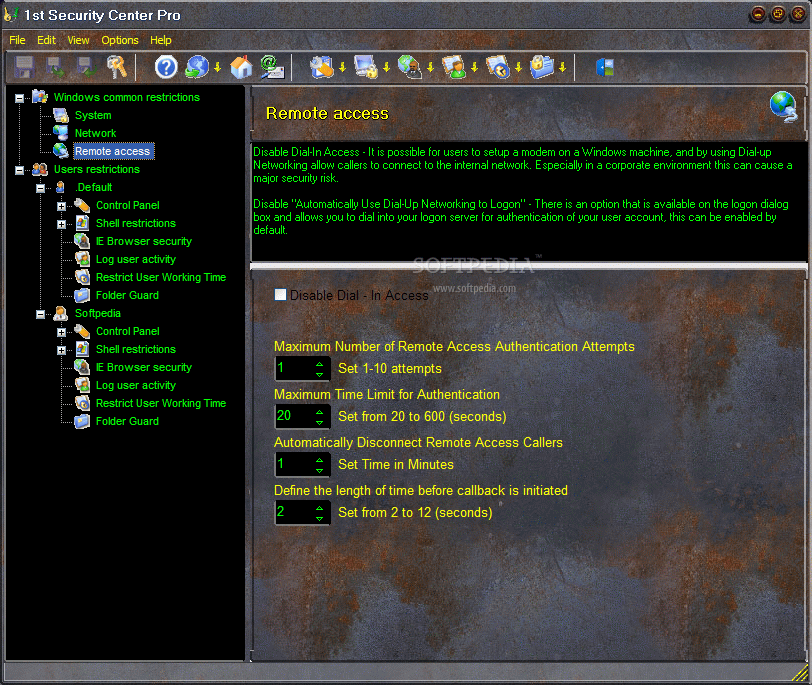
The interface can be changed due to the 37 skins the application is equipped with. Some of them are like salt in the eyes like Fallout Style, while others are just perfect for your needs (like Elegant). But after all it is just a matter of taste for choosing the right one.

The WYSIWYG looks make it easy to use and recommend it for newbies. Taking into consideration the options made available one can say that 1st Security Center Pro covers a vast area of your computer's options and settings.

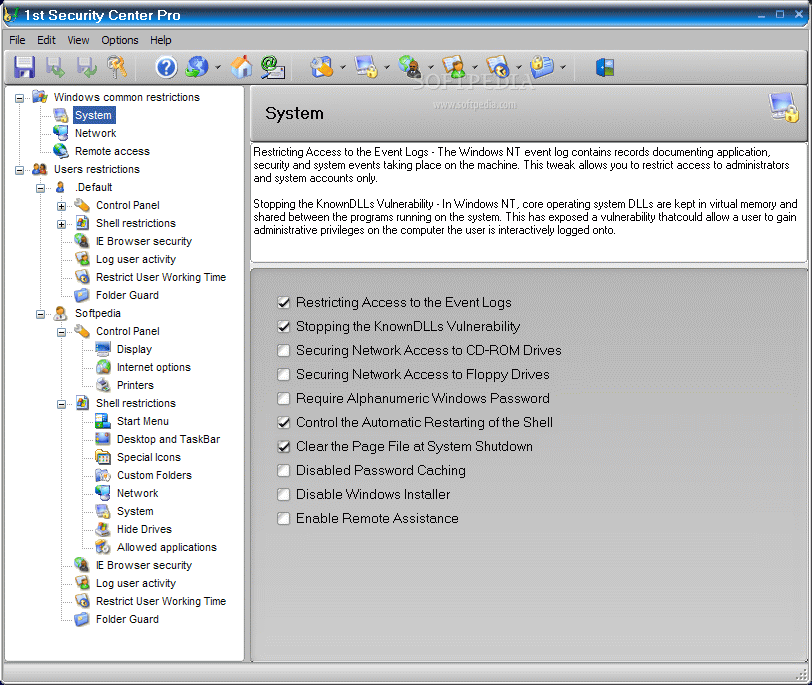
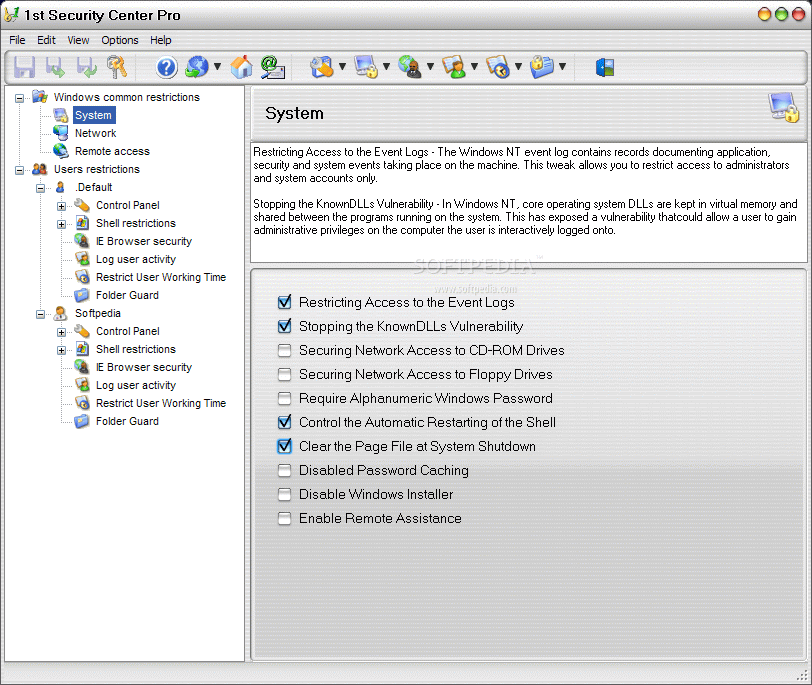
The tree in the left displays the areas of your computer that can be configured. But before deciding to impose any restrictions you should apply a password for launching the software. This way you will be sure that only authorized persons will tamper with your settings. The two general areas available are Windows Common Restrictions and Users Restrictions.

The first section includes configuring System, Network and Remote Access. The tips displayed for every section provide a brief description of the options available. System settings deal with restricting access to event logs, secure network access of CD-ROM drives, disabling the password caching, or enabling remote assistance.

Configuring the Network allows enabling and disabling a series of network related options like disabling file sharing, hiding share passwords with asterisks, hiding servers from the browser list or allow fast user switching. The options for Windows common restrictions do not stop here and the user can make the necessary configuration for the Remote Access. In this concern the number of remote access authentication attempts can be set as well as the maximum duration for remote access callers to stay connected or defining the length of time before callback is initiated.

User Restrictions is the area that provides the most variate option. The subfolders include all the users that have an account created on your computer. For each of them you can impose a number of limitations regarding the use of the Control Panel and Windows shell.

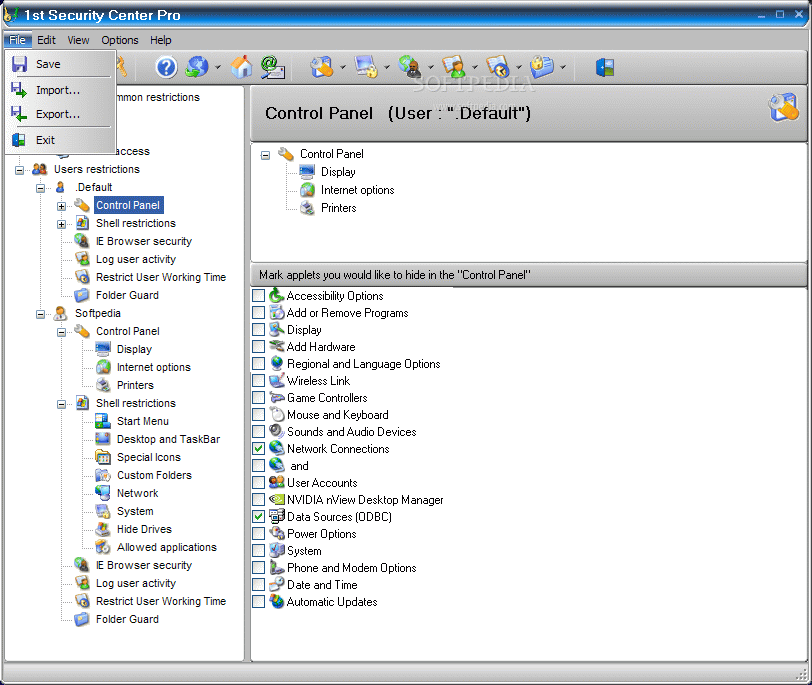
Control Panel restrictions include Display (disabling the applet, hiding the background page, the settings and appearance page), Internet Options (disabling the General/Security/Content/Connections/ Programs and Advanced tabs in Internet Options) and Printers (disabling addition/deletion of printers and hiding the General and Details pages). All this options can secure you against other peple's messing around with your general settings.

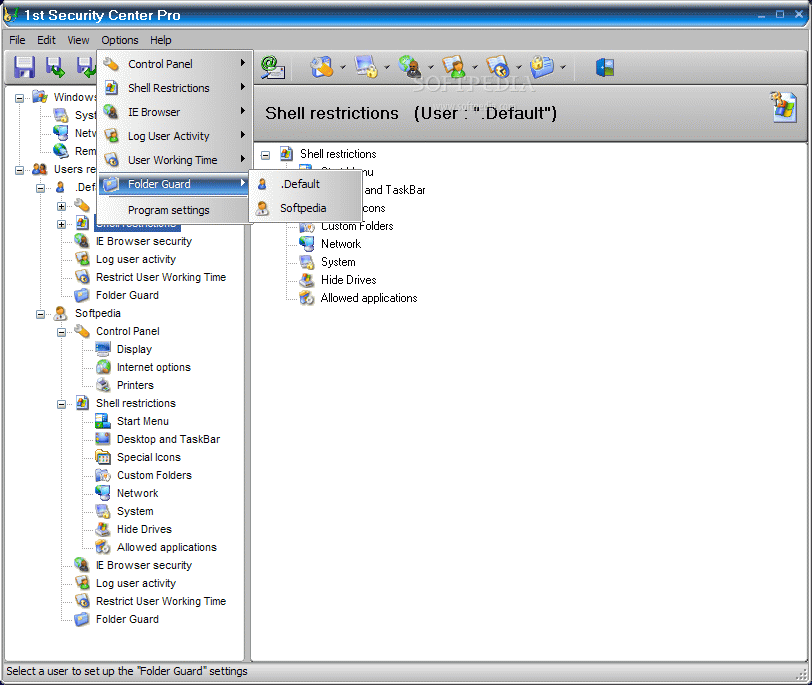
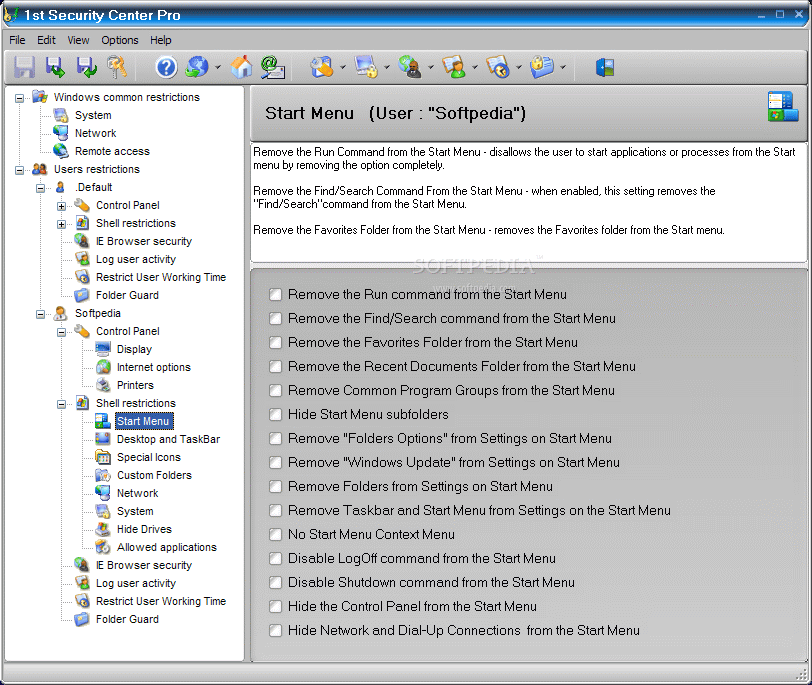
Shell restrictions area is the one where you should definitely take a look as there are some options that deserve special attention and can come in very handy. The suite of limitations available in the Start Menu solder comprise removing Run command from the Start Menu or disabling “Log Off” command. To be frank none of these options available in here worked in my case. I can't explain what happened because Start Menu restrictions were the only ones that did not function properly, even with numerous restarts of the machine.

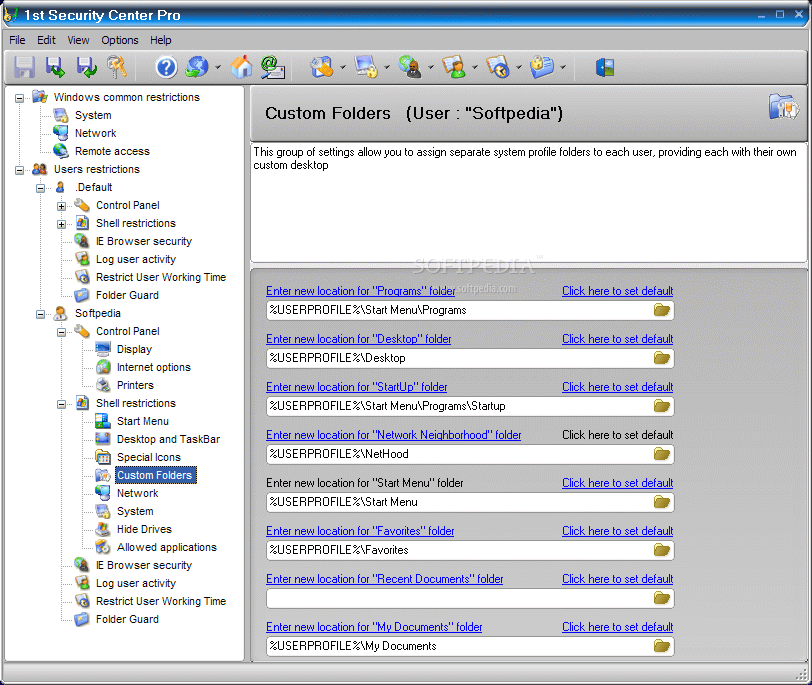
The last of the pictures shown below will stand as proof (as you can see the user is Softpedia both on my computer and in 1st Security Center, and the “Save” button activated; and yet the Run command is still available on my computer). On the other hand, the application had no problem with hiding the requested


icons (My Computer and Recycle Bin) from the desktop and bringing them back.

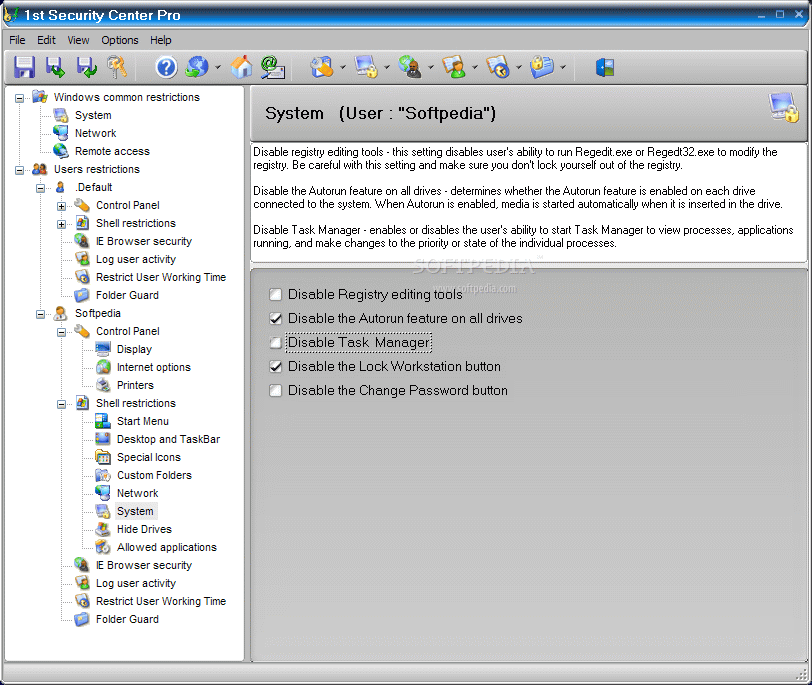
System settings in Shell Restrictions provides an easy way to disable the registry editing tools (this option really works), the task manager (also works) and the Autorun feature on all drives (works as well). When it comes to hiding drives, things partially work as the drives will indeed be hidden and Windows Explorer will indeed no longer display them, but working with the hidden volume in any other file manager is possible.

I am sure that you would like to decide which applications could one of your computers use and which not. Your wish comes true with 1st Security Center Pro as it sports the Allowed Applications option which lets the administrator of the program create a list with the softwares that a certain user should be able to open. During our testing the feature worked fine, but restarting the machine was necessary in order for the changes to take effect. However, there were some problems with the keyboard drivers as they were not on the list and after the display of the message announcing that using that application is restricted by the administrator, the favorite keys assigning dialog appeared.

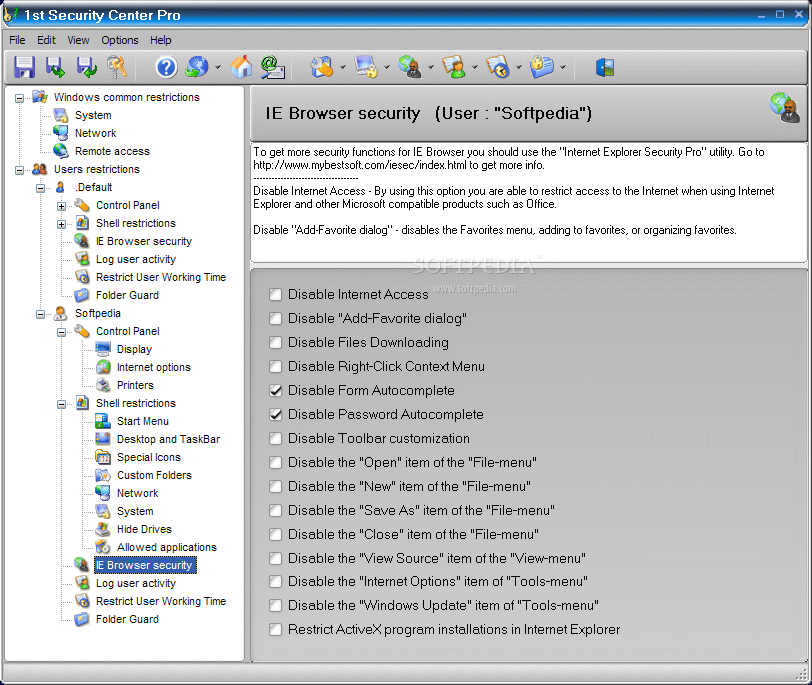
If you are an IE user, then there is a number of restrictions for this application to be applied too. You can disable the Internet access, the downloading of the files (once the first option is enabled all the rest involving Internet browsing are futile). Be careful with disabling the “Close” item in “File menu” as in Internet Explorer 7 there is no such option (well, there is “Exit”) and you will no longer be able to exit the application by using the Exit option or the “Close” button in the topmost right corner. In this case IE 7 can be shut down by killing its process in Task Manager.

Logging user activity option is available, but unfortunately during the testing all there was recorded was the name of the user and the time and date of the login on the computer. This would have been a very good option for checking out where the others are hanging on the Internet in your absence (sounds like a keylogger, doesn't it?).

Finally, my favorite features are at the end of the restrictions list. These are Restrict User Working Time and Folder Guard. The first one is particularly interesting as you can set up an interval and duration of an user's working time.

If the user's time limit has been set up and it has been reached, the computer shuts down and that user can not log-on again until their permitted time range arrives. Also if you un-check a particular day then the user won't be able to work on this day of the week at all.

In other words, you decide when a particular user can use your computer: duration, days of the week, time interval. This option gives you total control over your computer. Be sure you eliminate any Safe Mode Accessing so that you will not find yourself in an awkward situation when you cannot log into your own account because the administrator rights have been changed.

Folder Guard feature allows you to protect your files from deletion and decide who gets full access to them. The options available under this include protecting the data by making it “read-only” for any processes or hide it (makes it inaccessible for any processes). Additionally, It works with Network folders and fully supports protection of removable media (such as floppies, CD Roms, DVD, ZIP and some SCSI and RAID drives). To make it work you should set up the option "Enable Folders protection". Next press the "Add" button , enter the path to some folder you want to protect , enter File Mask , choose the protection mode.

The Good

Extraordinary features are available. If all of them would have properly worked then 1st Security Center Pro would have given you total control on your computer and other user's accounts.

Very easy to use and the tips explain each option available in the menus and folders.

The Bad

I wish it were more expensive and every option worked. Care should be taken when handling it as some features will continue to be in effect even if they are disabled in 1st Security Center Pro.

The Truth

I knew it was too good to be true the minute I saw the features and the price. Despite the very attractive price the application is not working properly and that is too bad as the features encapsulated are amazing.

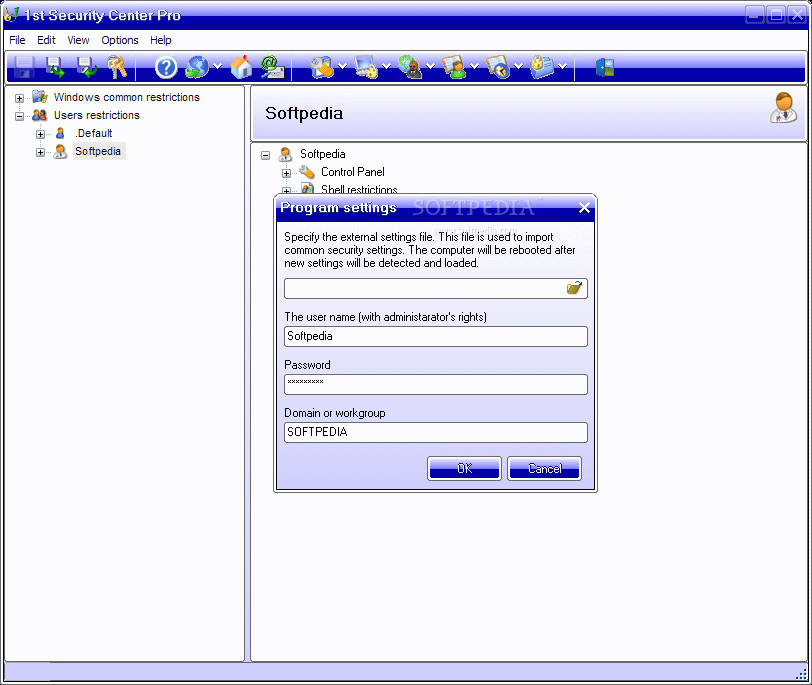
Here are some snapshots of the application in action:


Review imageReview imageReview imageReview image